 Outfit Check
Prepare your source
Upload a garment worn by a person or displayed on a mannequin. Keep the whole garment visible in the source.
Show clothing with volume, without a visible model.
A three-dimensional hollow garment with no visible person or mannequin.
Photos are uploaded for processing. Temporary inputs are removed from this studio when the set finishes. Saved references and results stay private. Processing services have their own retention policies.
Inspiration in practice
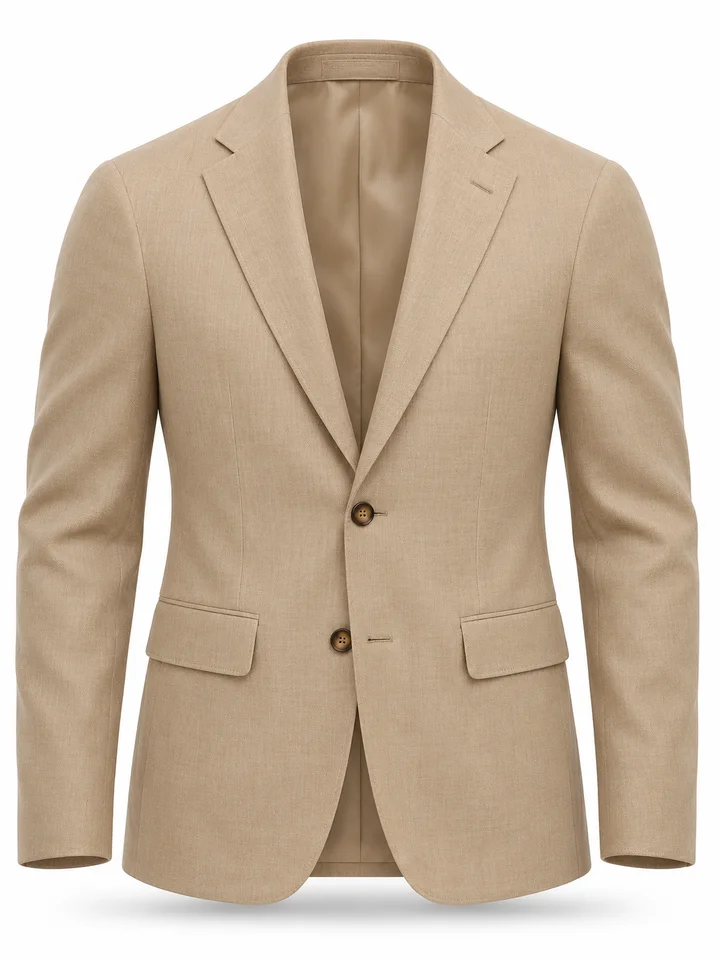
Removing the visible torso form lets the cream tweed jacket stand on its own while the sleeves and shoulders retain volume. The inside collar becomes part of the presentation. This approach directs attention toward construction and shape rather than toward a model or a decorated scene.
Try this toolA ghost mannequin image removes the wearer or mannequin while retaining a hollow, three-dimensional garment presentation. Unlike a flat lay, the clothing keeps a worn shape with a reconstructed neckline and interior.
Create clean apparel listing concepts where garment shape matters more than the person wearing it.
Upload a garment worn by a person or displayed on a mannequin. Keep the whole garment visible in the source.
Use the options above to set the effect you want. Check the credit estimate before you start.
Compare the result with your source and download the finished image or video.
Photograph the whole garment on a person or form, with the neckline, sleeves and hem visible. Even lighting helps preserve material and color cues. Review the inner collar and the boundaries of the reconstructed area, because those parts may not have been visible in the original.
Choose Ghost Mannequin for a dimensional product presentation. Flat Lay produces a different, arranged top-down look. Background Remover extracts visible pixels but does not aim to reconstruct the hollow neckline or the hidden interior.
Upload a garment worn by a person or displayed on a mannequin. Keep the whole garment visible in the source.
Interior collars and occluded fabric are reconstructed estimates. Inspect those areas closely and use real product photos when exact construction is essential.
Photograph the whole garment on a person or form, with the neckline, sleeves and hem visible. Even lighting helps preserve material and color cues. Review the inner collar and the boundaries of the reconstructed area, because those parts may not have been visible in the original.
Choose Ghost Mannequin for a dimensional product presentation. Flat Lay produces a different, arranged top-down look. Background Remover extracts visible pixels but does not aim to reconstruct the hollow neckline or the hidden interior.